Introduction
This solution was created during a quest for the ideal - both in terms of management and in terms of the Theory of Inventive Problem Solving (TRIZ).
Our definition of an ideal program, reflecting the principles formulated by Genrikh Altshuller during the development of TRIZ, is as follows:
1) An ideal program can be maintained and even improved by a programmer less qualified than its author, without the author's involvement.
2) An ideal program requires no changes or additions to its code when new functionality is added. Indeed, in an ideal program, adding functionality reduces the amount of code without degrading any of its characteristics, including performance.
And with programs written so fast and maintained so simply, their creation and maintenance could be entrusted to children. So the adults could spend their time doing great revelations.
The task
One of our projects uses the following task when interviewing programmers:
"There are three groups of organisations (legal entities):
- Our companies,
- A certain number of companies of the Client,
- A few companies of our suppliers.
Sometimes the same companies can be in different groups simultaneously (ie, sometimes some of our Customers can be our suppliers). There are people who:
- Work in the above-mentioned companies:
- in our companies,
- in the companies of our Clients,
- in the companies of our suppliers,
- Do not belong to any company - individuals who buy our products.
Build a database schema".
Let us consider three levels of answers: weak, medium, and ideal (which we will try to build using TRIZ).
First solution ("Weak")
The applicant created the following tables:
1) Table "Firms"
The Firm_id field is the primary key. The type of company is given in text form.
| Firm_id | Firm_name | Firm_type |
|---|---|---|
| 1. | Pan Myšlenek Company | Our company |
| 2. | TRIZ-RI Group | Client |
| … etc. | ... | ... |
| N. | Sychev&Co Ltd | Supplier |
2) Table "People"
Where field People_id – is a primary key, and field Firm_id – is foreign key linking to the table Firms.
| People_id | People_name | Firm_ID |
|---|---|---|
| 1. | Alexander Sychev | 1 |
| 2. | Alevtina Kavtreva | 2. |
| ...etc. | ... | ... |
| N. | Sergey Sychev | N. |
Obviously, this solution is weak. For example, you can't register an individual as a Client, and the design also fails in many other cases. As they say: "The database schema is not normalised ".
Second solution ("Medium")
Since the solution is weak, the requirement was strengthened to stimulate the applicant's imagination: "You must build not a simple, but an ideal model of data organisation", that is, one which does not have to be changed if previously unforeseen requirements arise. After all, you know that this is a standard requirement.
The applicant created the following 5 tables:
1) Table "Agents"
Where the field Agent_id is the primary key.
There can be any number of property fields (all necessary information: address, phone number, ownership, etc.).
| Agent_id | Agent_name | ... |
|---|---|---|
| 1. | Pan Myšlenek Company | ... |
| 2. | TRIZ-RI Group | ... |
| ...etc. | ... | ... |
| N. | Sychev&Co Ltd | ... |
2) Table "People"
Where the field People_id is the primary key.
There can be any number of property fields (all necessary information: address, phone number, email, etc.)
| People_id | People_name | ... |
|---|---|---|
| 1. | Alexander Sychev | ... |
| 2. | Alevtina Kavtreva | ... |
| ...etc. | ... | ... |
| N. | Sergei Sychev |
3) Table "Agent_People"
Here, the primary keys from the two source tables, Agent_id and People_id, are combined to form a composite primary key.
The field Agent_id is a foreign key linking to the table Agents, and the field People_id is a foreign key linking to the table People.
| Agent_Id | People_Id |
|---|---|
| 1 | 1 |
| 3 | 2 |
4) Table "Agent_types"
Where the field Type_id is the primary key.
| Agent_type_id | Agent_type_name |
|---|---|
| 1 | Our company |
| 2 | Client |
| ... etc. ... | ... |
| n | Supplier |
5) Table "Agent_agent_types"
Here, the primary keys from the two source tables, Agent_id and Type_id, are combined to form a composite primary key.
The field Agent_id is a foreign key linking to the table Agents, and field Type_id is a foreign key linking to the table Agent_types.
| Agent_id | Agent_type_id |
|---|---|
| 1 | 1 |
| 3 | 2 |
With this approach, all entities ("companies", "people") and their types are described separately from the interrelations. Hence, it is a good approach, because, when an unforeseen case arises, we simply add the new data to the lookup tables, we don't have to reorganise old tables or create new ones.
For example, if we need to register an individual - as a Client, or as a Supplier or even as our own staff - we just register a new type of agent "Individual" and fill the relevant tables, without creating anything new. Furthermore, in this implementation, the term "Firm" has been smartly replaced by a more abstract term "Agent", which allows us to treat a company as a special case, along with other types of agents.
This, of course, is a good thing. And if you look at the project more widely, it becomes clear that the addition of new entities will not require any changes in program code. As they say: "The schema is normalised."
During the interview, the developer was asked why the table "People" and the corresponding interrelations are needed in this case. After all, if an individual is registered as an agent, it is possible to add various types of agents: "Our employee", "Employee of a Customer", "Employee of a Supplier" etc., just like we did with the types of companies "Our company" etc. And leave only 2 tables: "Agents" and "Agent Types" instead of 5.
The developer reasonably answered that "people as people", the "people as agents" and "firms as agents" may have different properties, which must also be stored properly. Imagine that an "Agent" has a specific property "Date of the last transaction" or "Ownership", and "Our colleague" does not have such properties at all. These fields are not needed to describe the employee. Of course, in some particular cases we can possibly somehow unify the properties of different entities, but in general it should be assumed that they are just different.
We leave a bookmark here and move on.
We have discussed the positive sides of the second solution. Now let's discuss the negative ones.
So we are following the logic of this solution. Imagine that we would like to add not merely another variant of an existing entity type ("people", "agents"), but an entirely new entity type (with all of its properties), for example, documents. We would have to create a new table "Documents":
| Document_id | Document_name | ... |
|---|---|---|
| 1 | Contract N 7 ____ | ... |
| 2 | Invoice N 15 _______ | ... |
| 3 | Сertificate N 8 ________ | ... |
as well as the table which stores types of documents:
| Document_type_id | Document_type_name |
|---|---|
| 1. | Contract |
| 2. | Invoice |
| ...etc. | ... |
| N. | Сertificate |
Then create junction tables representing the relationships with people and agents. These are the tables:
| Agent_id | Document_id |
|---|---|
| 1 | 1 |
| 3 | 2 |
| People_id | Document_id |
|---|---|
| 1 | 1 |
| 3 | 2 |
The number of M junction tables connecting N entities is calculated as follows: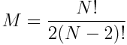
Hence, if we add K new entities, the number of junction tables will grow according to the formula:

Thus, if initially we had 2 entities, adding the third one will require 2 new junction tables to be created. Adding another – 3 more. Another – 4 more. And 5 more for the next one etc. n-1 for the n-th entity.
And that's not counting the number of tables which describe the entity itself. In the current example, there are two for each. So for this example, the number of tables increases according to formula: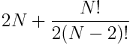 .
.
So for 12 entities we can end up having 90 tables, which radically reduces comprehensibility and complicates maintenance.
This is an obvious disadvantage. Therefore, method 2 can be called a "compromise". It is clearly better designed than the first one, but the idea has obviously not been thoroughly explored. And the reason for that (back to the "bookmark") is unresolved contradiction:
- "The properties of different entities should be different, so we can work with entities according to their features, and should not differ, so that the number of tables does not increase."
This contradiction was not resolved by the author of the second solution.
Third solution. Building the ideal database design
The name that can be named is not the eternal name.
Lao Tzu
Now let's try to apply TRIZ. Let's try to resolve the contradiction described in the previous paragraph and to create a truly ideal structure to store any data we want. Let's change a little bit the classical formulation of TRIZ in our case and write: "There is no object, but its data is stored."
But what is the record of an object? Strictly speaking, an information system cannot contain the physical object itself. Because it deals only with information, it contains descriptions of objects. What is an object description? It is a set of keys and values. And what about the names of the objects? See epigraph. For the informational systems, the quote of Lao Tzu should not be understood as a metaphor, but literally. There are no objects in the database, there are only keys and values.
Let's do so, shall we?
Entities (object’s keys)
| _id integer primary key autoincrement |
|---|
| 1 |
| 2 |
| 3 |
| 7 |
| 11 |
Properties (of any entities)
- _id Integer foreign key = Identifies the entity to which the current property belongs.
- Names = Name of property (String)
- Values = Value of property (String)
| _id Integer foreign key | Names | Values |
|---|---|---|
| 1 | ||
| 2 | ||
| 2 | ||
| 7 | ||
| 11 |
This approach provides a “one to many" relationship. Any data can be obtained with a single query, hence good performance is achieved. That's a good point. However, if there are entities with the same properties, we end up having identical records in the table Properties. That's a problem. A significant problem.
Let us try, for example, to store documents we make when dealing with our counterparties. Let the document type ("Document_Type" property) always be chosen from a fixed set of options (let it be "invoice", "contract", "acceptance certificate", etc.), and let the vendors often be the same ("Provider" property).
Then if we make, for example, three thousand deals this will create 3,000 new records, which will have identical properties "Document_Type" and "Provider". 6000 identical records in total. And that is so if we assume that only two of all properties are the same. In general, if we add to table Properties m entities with n properties, k of which are identical (k<=n), it will generate m*n new records (k*m of which are identical). This database will grow rapidly, but will work fast for its size.
Let us improve the solution following the general logic of normalisation, moving all values from the table Properties (except ID) into separate tables. That means that two new tables are created: table Names and table Values. They will store only unique names and values of properties respectively, which will then be "gathered into sets" of properties in the table Sets.
Keys in the table Sets are not unique. They link the ID of the set of properties with properties themselves.
Sets (of property names and values)
Here:
- id - integer
- Name_id - integer foreign key table Names
- Value_id - integer foreign key table Values
| id | Name_id | Value_id |
|---|---|---|
Names (of properties)
| _id integer primary key auto-increment | Names String |
|---|---|
Values (of properties)
| _id integer primary key auto-increment | Values String |
|---|---|
Any data can be obtained using a single query, thus good performance is achieved. Duplicate records are not created as well. If we add m sets with n names/values of properties, k of which are identical (k<=n), it will generate n-k new records in table Names/Values and m*n in table Sets. (If k=n, new records in the table Names/Values are not created at all).
Thus, space is saved when we add sets with identical properties. The size of such database will grow much slower because when you add duplicate name/value only table Sets increases in size.
Here we have to make the necessary methodological remark: There are no objects, there are no names of objects, there is no evidence that they exist at all ("There is no spoon") There are only properties (names of properties, values of properties and sets of properties). You can gather these properties in any way you want. You can mark gathered “set of properties” with a tag (give an appropriate name), but you, as a developer, should not consider this "pack" of properties as an "object" because doing so introduces inertia of thinking. Spoon (fork, groundhog) does not have properties, but "this pack of properties" we (if we have such a weird idea) label as "spoon", this as "fork ", this as "groundhog ".
You have obviously already noticed that the initial contradiction: "Properties of different entities should be different, so we can work with entities according to their features, and should not be different, so the number of tables would not increase." - is eliminated.
We can now group any properties into the corresponding Set and process them in whatever specific way is required. This gives us a universal interface for arbitrarily specialised entities.
But let us continue the system convolution process, reducing the number of database tables while preserving the same set of features:
The table "Names" contains two columns "Id" and "Names". both storing only unique values.
New names (of properties)
| _id integer primary key auto-increment | Names String |
|---|---|
But the second column of this table is used only for the understanding of what we are working with only by the programmer (not by a user, not even by a program), and for nothing else. In addition, the table Names stores a one-to-one mapping between unique IDs and unique names. So, you can use only one field.
Since the search through numerical identifiers is faster, you can just throw column Names away, leaving only the column ID. (How to do that without the programmer losing comprehension will be described further on.)
Then, since there is only one column ID, you can throw away the entire table Names and track identifiers we put in table Sets in field Name_id.
Thus, only two tables remain in our database: the table Values (same as it was) and the table Sets, which now has a composite primary key (Set_id, Name_id) and a Value_id foreign key referencing the appropriate row in the Values table.
New sets (of property names and values)
Here:
- Set_id - integer
- Name_id - integer
- Value_id - integer foreign key table Values not null
| Set_id | Name_id | Value_id |
|---|---|---|
New values (of properties)
| Value_Id integer primary key | Values |
|---|---|
The table Names has disappeared (again remember Lao Tzu :)), or rather, has become ideal. Now it is gone, but its function is completely performed. Again remember TRIZ.
So now we have a significant gain in performance due to the fact that the whole table was thrown away. Before that, it was necessary to go through this entire table in order to determine the numerical identifier corresponding to a string parameter. Now this operation, which involved comparing a large number of strings, is no longer required.
Let's return to our example and populate our universal and simultaneously specific database:
Final sets
Here:
- Set_id - integer
- Name_id - integer
- Value_id - integer foreign key table Values not null
| Set_id | Name_id | Value_id |
|---|---|---|
| 1 | 4 | 3 |
| 1 | 3 | 1 |
| 2 | 2 | 1 |
| 2 | 1 | ... |
| ... | ... | ... |
Final values
| Value_Id | Values |
|---|---|
| 1 | Pán Myšlenek Company |
| 2 | TRIZ-RI Group |
| 3 | Alexander Sychev |
| 4 | Сertificate No. 8 ________ |
| 5 | ...etc |
One could argue that the situation has become less readable. For example, we do not see any human readable information in the field name_id in our first table, and we have no idea what entities we are dealing with. We only see their IDs (4,3,2,1). The machine understands everything and works fast, but for humans it is not very convenient.
Queries also end up being barely readable as well, for example:
get(2, 1, None)
(Note: we use Python in this example; equivalent examples can be written in other languages.)
Contradiction
Once again we have a contradiction:
- "Name should be called explicitly for the sake of convenience of the programmer, and should not be called at all, so that machine does not look through the whole new table, which is, by the way, filled with string data." What should we do?
We solve this contradiction by moving the list of names out of the "search area" since it is the zone with contradiction. It is possible to determine which ID corresponds to representation which is readable to the programmer outside of the database - at the program level.
For that purpose let us create a dictionary (for example in header file), which contains a list of constants as follows:
document_name = 1
provider_name = 2
agent_name = 3
people_name = 4
After that our queries gain a readable form (for example): \
get_document(2, document_name, None)
So no extra table, and great performance.
Note about the predecessors
Here we should properly refer to a pretty well-known model of data organisation called EAV (Entity - Attribute - Value), which is pretty similar to the structure described above but was created much earlier. And we point that out with great respect.
But at the same time, we want to point out differences in our implementation. These differences eliminate several problems that are not inherent in EAV itself but are common in many of its better-known, poorly designed implementations.
The difference is described in the previous paragraph: one should not store descriptions “made for humans” in the database. In the latest stage of system convolution, the same set of features is provided by two tables instead of three. The table which in EAV is called Attribute, and in our case called Names, is eliminated and replaced by a list of constants stored in a header file. That gives a significant improvement in performance without any inconveniences for the programmer.
There is another major difference in described implementation. All Values are stored in a separate table consisting of 2 columns ID and Values. It means that “values” are separated from “Sets” and not mixed with them, which firstly dramatically decreases the size of the database and secondly makes it work a lot faster.
The topic of this database's performance will be discussed below in section 3. We hope that, considering the facts presented in this article (above and below in section 3), all statements about the poor performance of databases with the key-value model will turn into myths and legends. But we insist on using this exact implementation described in this publication. Let's call it “EAV as Owls”.
About the code
Now consider the possibilities which the programmer gains using this data structure.
Clear example
Supposing we need to make a selection (get). Now we can write universal operations in this style:
searches = []
names = ["list all required parameters here"]

for name in names:
    searches.append(get(set_id, name, value)) # "Gene" of the data structure
For example, the following code will find all people, all agents, all documents and all goods:
searches = []
names = ["people", "agents", "documents", "goods"] # Look here

for name in names:
    searches.append(get(None, name, None)) # Using None as a placeholder
None serves as a sentinel indicating that the corresponding argument has been omitted.
Note: In order to simplify and unify the code, we will try to use this rule regularly: structure
setID, name, value
will always be used in the corresponding function, but when a particular variable is not needed, we will pass the sentinel value instead.
So, if any new entity appears (for example, "Deals"), and we need to expand the query to receive "all the deals" as well, we do not need to write any additional functions or query logic, we only write corresponding entries in the table Values and Sets of our database (if such entities did not exist before) and specify the "deals" in the "get" function:
searches = []
names = ["people", "agents", "documents", "goods", "deals"] # only added "deals"

for index, name in enumerate(names):
    searches.append(get(None, name, None))
You may agree that if database schema was different, we would need to do something like:
get_all_people()
get_all_agents()
get_all_documents()
get_all_goods()
get_all_deals()
And that is pretty bad.
But let's move on. Let's go back to our contradiction: the properties should be different and should not be different. But let us no longer consider it at the level of the database schema, but at the level of the program code as well.
First let's select "people as people", and display the universal properties for each of them, such as name, gender, phone, email, weight, height, eye colour, etc.
Of course, we do not write function for each property:
people = get_people()
for person in people:
    print(get_people_name(person))
    print(get_surname(person))
    print(get_phone(person))
    print(get_email(person))
    print(get_weight(person))
    print(get_height(person))
    print(get_eye_colour(person))
Let's make our request in the same way we did before:
people = get(Set_id=None, Name="surname", Value=None)
# assuming that the property "name" is for people only

attributes = ["name", "surname", "sex", "phone", "email", "weight", "height", "eye_colour"]

for person in people:
    for attribute in attributes:
        print(get(person, attribute, None))
Now let's choose a different context and select "people as agents". Let us be interested in other properties. No eye colour, height or weight, but, for example, details of the transaction made with us and related products and documents in addition to the contact itself.
We do not write new functions, but only change the parameters in the marked line:
people = get(Set_id=None, Name="surname", Value=None)

attributes = ["people_name", "surname", "contracts", "goods", "documents"
             ...list of all required parameters] # look here

for person in people:
    for attribute in attributes:
        print(get(person, attribute, None))
It is clear that if we constantly require a different "set" of settings (people in different contexts: "people", "our employees", "agents", "as employees of the suppliers", "as employees of the Customers company", "as lovers" etc.), we will always use just one function:
people = get(Set_id=None, Name="surname", Value=None)
attributes = ["list all required parameters here"]

for person in people:
    for attribute in attributes:
        print(get(person, attribute, None))
We got a function close to the ideal, which does not indicate any entity explicitly (hence, after any reorganisation of data, the code does not change at all), but, nevertheless, it responds properly depending on the parameters passed.
Now let's standardise a requirement to the parameters of the "ideal function". Let it always require only 3 parameters: "ID of set of properties", "name of property", "value of property", which represent the "copy" ("gene") of our universal data structure described above (Set_id, Name, Value):
def any_function(set_id, Name, value):
# or just:
def any(set_id, "name", value):
# Any function implementation goes here
    pass
where:
- Set_id - ID of set of properties
- Name - name of property
- Value - value of property
Another methodological remark: apparently, code and data are not stored together. The abstraction is taken quite far, and normalisation is carried to the point of its dialectical negation. But there is no encapsulation in OOP sense at all.
We do not mix the data and code that works with it, hence we don't create any objects, neither in general sense nor in OOP sense. The code is universal so it works with any type of data, and any type of data also does not have its "personal code". We do not make "smart objects" we make "dumb data sets" and "dumb functions" separately from each other. The difference with the OOP is obvious.
Continue the optimisation
Let us continue the optimisation
Any good manual on database design mentions the CRUD, and that all work with databases is reduced to four operations: "Create", "Read", "Update", "Delete".
Let's implement this set of tasks here, considering the idealisation of code described above. Communication between the application and the database is handled through a universal interface, or kernel. The application need not know the database schema, and the database need not know which application uses it. Here we will only list key "kernel functions" (it is an article after all), and if we receive numerous requests to publish the entire kernel, we will publish it separately.
Key kernel functions are: "Get", "Add", "Delete".
Read:
def get(Set_id, Name, Value):
Create & Update:
def add(Set_id, Name, Value):
Delete:
def delete(Set_id, Name, Value):
Let us examine them in detail, as they are carrying out the mission of relieving the programmer of the need to know the database schema, let alone SQL. Firstly, because, considering what was said above, the entire SQL language is reduced to very primitive lines, and secondly, "kernel functions" are creating these lines, and the kernel itself sends retrieved data where it is required.
Function "Get"
def Get(Set_id, Name, Value):
# Gets a record from the database, depending on the parameters passed.
1) def Get(Set_id=None, Name, Value):
# Returns identifiers of sets ("Set_id"),
# which have the property with name "Name" with value "Value".
2) def Get(Set_id=None, Name, Value=None):
# Returns the identifiers of sets ("Set_id"),
# which have a property with name "Name".
3) def Get(Set_id, Name, Value=None):
# Returns the value of the property with name "Name" and set identifier "Set_id".
4) def Get(Set_id, Name=None, Value):
# Returns the name of property with set identifier "Set_id" and value "Value".
5) def Get(Set_id, Name=None, Value=None):
# Returns all property of set with identifier "Set_id".
As stated above, the Get function is also responsible for the automatic creation of SQL queries
Supposing we want to get a property of set with the identifier Set_id = 1.
We should fill in the functions parameters Get ( Set_id, Name, Value) as follows:
def get(Set_id=1, Name, Value=None):
The function will generate and execute the following SQL queries:
SELECT VALUE_ID FROM SETS WHERE SET_ID = 1 AND NAME_ID = 2;
SELECT VAL FROM VALUES_STRING WHERE VALUE_ID = 3;
If we change the input as follows:
def get(Set_id=1, Name=None, Value=None):
The function will generate and execute the following SQL queries:
SELECT NAME_ID,VALUE_ID FROM SETS WHERE SET_ID = 1;
SELECT VAL FROM VALUES_STRING WHERE VALUE_ID = 1;
SELECT VAL FROM VALUES_STRING WHERE VALUE_ID = 2;
SELECT VAL FROM VALUES_STRING WHERE VALUE_ID = 3;
SELECT VAL FROM VALUES_STRING WHERE VALUE_ID = 4;
SELECT VAL FROM VALUES_INT WHERE VALUE_ID = 6;
Or as follows:
def get(Set_id=1, Name=None, Value=23):
The function will generate and execute the following SQL queries:
SELECT VALUE_ID FROM VALUES_INT WHERE VAL = 23;
SELECT NAME_ID FROM SETS WHERE SET_ID = 1 AND VALUE_ID = 6;
Or as follows:
def get(Set_id=None, Name=email, Value="admin@triz-ri.com"):
The function will generate and execute the following SQL queries:
SELECT VALUE_ID FROM VALUES_STRING WHERE VAL = 'admin@triz-ri.com';
SELECT SET_ID FROM SETS WHERE NAME_ID = 3 AND VALUE_ID = 9;
Or as follows:
def get(Set_id=None, Name=login, Value=None):
The function will generate and execute the following SQL queries:
SELECT SET_ID FROM SETS WHERE NAME_ID = 0;
Or as follows:
def get(Set_id=None, Name=None, Value=32):
The function will generate and execute the following SQL queries:
SELECT VALUE_ID FROM VALUES_INT WHERE VAL = 32;
SELECT SET_ID FROM SETS WHERE VALUE_ID = 10;
Function "Add"
Now let's take a closer look at the "Add" function:
def Add(Set_id, Name, Value):
# Adds record to the database (or updates it), depending on the parameters passed.
1) def Add(Set_id=None, Name, Value):
# Creates a new set with property which has name Name and value Value
# and adds it to the database.
For example,
def add(Set_id=None, Name=login, Value="admin3"):
The function will generate and execute the following SQL queries:
SELECT VALUE_ID FROM VALUES_STRING WHERE VAL = 'admin3';
UPDATE OR INSERT INTO VALUES_STRING (VALUE_ID, VAL) VALUES (1, 'admin3')...
                                                                ...matching (VALUE_ID);
INSERT INTO SETS (SET_ID, NAME_ID, VALUE_ID) VALUES (1, 0, 1);
2) def Add(Set_id, Name, Value)
# Adds property with name Name and value Value to the set with the ID Set_id,
# or updates it, if such property has already been set.
For example,
def add(Set_id=None, Name=password, Value="123456"):
The function will generate and execute the following SQL queries:
SELECT VALUE_ID FROM VALUES_STRING WHERE VAL = '777';
UPDATE OR INSERT INTO VALUES_STRING (VALUE_ID, VAL) VALUES (12, '777')...
                                                                ...matching (VALUE_ID);
SELECT VALUE_ID FROM SETS WHERE SET_ID = 1 AND NAME_ID = 1;
SELECT SET_ID FROM SETS WHERE VALUE_ID = 2;
UPDATE OR INSERT INTO SETS (SET_ID, NAME_ID, VALUE_ID) VALUES (1, 1, 12)...
                                                         ...matching (SET_ID, NAME_ID);
Such variation is also possible:
SELECT VALUE_ID FROM VALUES_STRING WHERE VAL = 'admin6';
UPDATE OR INSERT INTO VALUES_STRING (VALUE_ID, VAL) VALUES (11, 'admin6')...
                                                                ...matching (VALUE_ID);
SELECT VALUE_ID FROM SETS WHERE SET_ID = 1 AND NAME_ID = 0;
SELECT SET_ID FROM SETS WHERE VALUE_ID = 1;
DELETE FROM VALUES_STRING WHERE VALUE_ID = 1;
UPDATE OR INSERT INTO SETS (SET_ID, NAME_ID, VALUE_ID) VALUES (1, 0, 11)...
                                                         ...matching (SET_ID, NAME_ID);
Here the function ADD "cleans up" the database, ie removes the value that no one uses anymore.
You can pass multiple names and values at the input of the ADD function:
vals = ["admin", "123456", "Peter", "admin@triz-ri.com", 32]
obj_id = add(None, names, vals)
Then it creates an entire set with specified properties:
SELECT VALUE_ID FROM VALUES_STRING WHERE VAL = 'admin';
UPDATE OR INSERT INTO VALUES_STRING (VALUE_ID, VAL) VALUES (7, 'admin')...
                                                                ...matching (VALUE_ID);
INSERT INTO SETS (SET_ID, NAME_ID, VALUE_ID) VALUES (2, 0, 7);

SELECT VALUE_ID FROM VALUES_STRING WHERE VAL = '123456';
INSERT INTO SETS (SET_ID, NAME_ID, VALUE_ID) VALUES (2, 1, 2);

SELECT VALUE_ID FROM VALUES_STRING WHERE VAL = 'Петр';
UPDATE OR INSERT INTO VALUES_STRING (VALUE_ID, VAL) VALUES (8, 'Peter')...
                                                                ...matching (VALUE_ID);
INSERT INTO SETS (SET_ID, NAME_ID, VALUE_ID) VALUES (2, 2, 8);

SELECT VALUE_ID FROM VALUES_STRING WHERE VAL = 'admin@triz-ri.com';
UPDATE OR INSERT INTO VALUES_STRING (VALUE_ID, VAL) VALUES (9, 'admin@triz-ri.com')...
                                                                 ...matching (VALUE_ID;
INSERT INTO SETS (SET_ID, NAME_ID, VALUE_ID) VALUES (2, 3, 9);

SELECT VALUE_ID FROM VALUES_INT WHERE VAL = 32;
UPDATE OR INSERT INTO VALUES_INT (VALUE_ID, VAL) VALUES (10, 32) matching (VALUE_ID);
INSERT INTO SETS (SET_ID, NAME_ID, VALUE_ID) VALUES (2, 5, 10);
Function "Delete"
Let's take a closer look at the "Delete" function:
1) def delete(Set_id, Name):
# Removes the property with the name Name from the set with the identifier Set_id.
def delete(Set_id=1, login):
The function will generate and execute the following SQL queries:
SELECT NAME_ID,VALUE_ID FROM SETS WHERE SET_ID = 1 AND NAME_ID = 0;
SELECT SET_ID FROM SETS WHERE VALUE_ID = 11;
DELETE FROM VALUES_STRING WHERE VALUE_ID = 11; (Here the Delete function "cleans up"
the database, ie removes the value that no one uses anymore.)
DELETE FROM SETS WHERE SET_ID = 1 AND NAME_ID = 0;
def delete(Set_id, Name=None): # Removes the set with the corresponding identifier
def delete(Set_id=1, Name=None):
The function will generate and execute the following SQL queries:
SELECT NAME_ID,VALUE_ID FROM SETS WHERE SET_ID = 1;
SELECT SET_ID FROM SETS WHERE VALUE_ID = 1;
DELETE FROM VALUES_STRING WHERE VALUE_ID = 1;
DELETE FROM SETS WHERE SET_ID = 1 AND NAME_ID = 0;

SELECT SET_ID FROM SETS WHERE VALUE_ID = 2;
DELETE FROM SETS WHERE SET_ID = 1 AND NAME_ID = 1;

SELECT SET_ID FROM SETS WHERE VALUE_ID = 3;
DELETE FROM VALUES_STRING WHERE VALUE_ID = 3;
DELETE FROM SETS WHERE SET_ID = 1 AND NAME_ID = 2;

SELECT SET_ID FROM SETS WHERE VALUE_ID = 4;
DELETE FROM VALUES_STRING WHERE VALUE_ID = 4;
DELETE FROM SETS WHERE SET_ID = 1 AND NAME_ID = 3;

SELECT SET_ID FROM SETS WHERE VALUE_ID = 6;
DELETE FROM VALUES_INT WHERE VALUE_ID = 6;
DELETE FROM SETS WHERE SET_ID = 1 AND NAME_ID = 5;
And we'll talk about performance in the next chapter.
About the performance
After describing the interface that works with the database, we should discuss the performance.
First, let's take a closer look at search operations:
Case of "Get"
def get(SetId, Name, Value):
Let's define operations which have Value parameter equal to None as "fast", whether parameters setID and Name are known or unknown. These operations are "fast" because they compare integer fields (field Set_ID and field Name_ID), and not searching through Value field.
Let's define as "potentially slow" those operations for implementation of which we need to define which value_id in table Values corresponds to a given value. They are slow because they require comparison of strings, and their number is going to be huge, according to the statement of the problem. It should be mentioned that this comparison will only be slow when data type in Values table is String.
In the case of other types, the search goes much faster, and there are no problems with the performance at all. In any case, if the problem is solved for the string type, it is solved for any other type as well.
Then let's take a look at the situation where we need to scan a very large table Values which contains string data. Usually, in this scenario it is structured in such way so it is possible to refer to the table with fewer rows. So, the desired end result is fewer rows per table which we are scanning, rather than the structure of data itself. That means we should - ideally - have more Value tables with easy maintenance, without introducing unnecessary type-based partitioning.
So let's partition our table into a few smaller ones. They are simple, they have the same two fields: Id and Value. The unique identifier is generated automatically, regardless of which table the data is stored in.
Any number of such similar simple and primitive tables does not complicate maintenance of our program at all. Moreover, it makes it easier than in the "standard normalised case" because the programmer does not need to learn (understand, remember, describe, explain, etc.) the database schema.
The dispatcher function (defining which Value table to use for storing the data and in which table to look for requested data) is placed in the same place, where we store a list of names. For example:
# List of names:
Document_name = 1
Provider_name = 2
Agent_name = 3
People_name = 4
# dispatcher:

def table_for_name(name):

    values1 = "VALUES_1"
    values2 = "VALUES_2"

    t1 = [Document_name, Provider_name]
    t2 = [Agent_name, People_name]

    if name in t1:
        return values1
    if name in t2:
        return values2

    return None
The dispatcher function selects the table to scan before a database query is executed. Scanning several thousand or tens of thousands of records is quite fast. Thus, when the query parameters are supplied, the kernel itself determines which specific Values table to use. Since that table does not contain too many rows, the search is fast.
You can change the dispatcher code in whatever way you like if you partition your tables by your own method. The kernel code, specifically the functions add, get, and delete, will not change at all.
So how should we partition our tables? If the data has different types, divide it among different Values tables, such as String Values and Integer Values. That may be sufficient, since this data type would require only a Boolean Values table containing two rows: true and false. String Values may be partitioned into separate tables for data added rarely and data added frequently. Frequently added string data should be stored separately and partitioned further only when the table contains many hundreds of thousands of rows, or more, depending on the objectives of the project.
In general, the task of choosing the method for partitioning a large table into several smaller ones is quite typical. Many major Internet services, not only "cut" their tables, but also store them on different servers. Actually, their structure, in this case, is not important, since one specific table is divided into several smaller ones. A table in our case the table is primitive as well. For the general case you can find some information here, https://msdn.microsoft.com/en-us/library/dn589797.aspx or google "Database Sharding".
Now, we see that search operations and, as a result, the get function, are performed optimally. So now let's see how do remaining kernel functions (add and delete) perform themselves (the get function is already discussed above).
Cases of "Add"
def add(SetId, Name, Value):
Case 1:
def add(SetId, Name, Value):
# updates the existing property with name Name and value Value
# for the set with id Set_id.
Here the add function checks (search operation), whether there is a requested value in the corresponding Values table. If there is none, it creates it (add operation). Then it creates a record in the table Sets, representing a pointer to this value (add operation).
It is also tested, whether there are other sets with the same property (with the same Name and the same Value_id) - a fast search operation.
If there is none, the function deletes the Value from the corresponding table.
Both adding operations are fast. Search operations are discussed above - thus taking this into account, the function is fast.
Case 2:
def add(Set_id=None, Name, Value): # creates a new Set with known property
In the second case, the add function immediately generates a new SetId and works in the same way as in Case 1 because Set_id is now known. Thus, the second case reduces to the first.
There are no other meaningful add operations: with Name = None, no property name whatsoever is specified; with Value = None, no value whatsoever is specified. This constraint is reflected in the definition of the Sets table.
Thus, the add function is fast.
Cases of "Delete"
def delete(id, name):
Case 1:
def delete(id,name):
# removes the property with name Name from the set with the identifier id
Here the delete function searches for a set with the identifier id (search operation). Then it searches for the property with name Name and corresponding Value_id (the search operation we discussed above, we now know that it is fast).
Then it checks whether there are other sets with the same property (with the same Name and the same Value_id) - a fast search operation.
If there is none, deletes the Value from corresponding Values table, and then removes the record from the table Sets which stores the pointer to the property. All of these removal operations are standard and fast.
Case 2:
def delete(id, name=None):
# removes the entire set with identifier id and all of its properties
Here the delete function searches for all of the properties associated with the given set (comparing two numbers is fast operation), and then removes them, just as described in Case 1.
Thus, the delete function is fast.
Questions and Answers
What is Ideal Data Structure?
The ideal data structure, as inspired by TRIZ and the quest for the ideal in programming and data organisation, is characterised by two main principles:
- The ideal program is one that can be maintained and even improved by a programmer with a lower qualification than the author, and even without the author being involved.
- The ideal program is one that does not require any changes or additions to the code when new functionality is added. In fact, for an ideal program, increasing functionality leads to a reduction in the amount of code, without any harm to any of its characteristics (for example, performance).
What does the ideal data structure consist of?
The ideal data structure, as described, consists of two main tables: 'Sets' and 'Values'. The 'Sets' table links to the 'Values' table through the Value_id field, which acts as a foreign key in the 'Sets' table pointing to the unique identifier in the 'Values' table:
The 'Sets' table, which has three fields:
Set_id (integer)
Name_id (integer)
Value_id (integer foreign key to table Values not None)
The 'Values' table, which stores unique values of properties with two columns:
ID (integer)
Values (string)
This structure allows for efficient data storage and retrieval, minimising duplicate records and maintaining good performance even as the database grows.
The approach eliminates the need for a separate 'Names' table by using a dictionary or list of constants in the application code to map human-readable names to their corresponding IDs, thus further optimising performance.
How is data redundancy minimised in the ideal database schema?
All the properties are moved from the appropriate 'Properties' table (except ID) into separate 'Names' and 'Values' tables, which store only unique property names and values respectively.
This change prevents the creation of duplicate records for identical properties, as properties are 'grouped into sets' in the 'Sets' table, significantly reducing redundancy.
Further optimisation is achieved by eliminating the 'Names' table, leaving only two tables: 'Sets' and 'Values'. This final structure ensures that data redundancy is minimised by storing only unique property names and values and linking them efficiently through sets, thus saving space and improving performance.
What happened to the 'Names' table?
The 'Names' table was effectively eliminated in the process of optimising the database schema. Initially, it contained two columns: 'ID' and 'Names', both storing only unique values. However, it was determined that the second column, which was used only for the understanding of what was being worked with by the programmer (and not by a user or a program), could be discarded.
This led to the decision to use only the column 'ID', since searching numerical identifiers is faster. Eventually, the entire 'Names' table was removed, and identifiers previously stored in the 'Name_id' field of the table 'Sets' were tracked directly, leaving only two tables in the database: 'Values' and 'Sets'. This change significantly improved performance by eliminating the need to scan the entire 'Names' table to determine the numerical identifier corresponding to a string parameter.
How are property names and values managed without the 'Names' table in the database schema?
In the absence of the 'Names' table, property values are managed by utilizing a list of constants stored in a header file, which acts as a dictionary.
This list contains a set of constants that correspond to the names of properties, allowing for the identification of property names through their associated numerical identifiers rather than string names.
This approach eliminates the need for the 'Names' table, thereby improving performance by avoiding the comparison of a large number of strings.
The constants in the header file provide a readable form for queries, making it convenient for programmers while maintaining efficient database operations.
Show a clear example of why a query to an ideal data structure is simpler than the same query to a relational database schema
In the context of the ideal data structure as described, a query to retrieve data is simplified by the elimination of the 'Names' table and the use of a dictionary or list of constants in the application code. This approach reduces the complexity of queries by avoiding the need to join multiple tables to resolve human-readable names to their corresponding IDs.
For example, in a relational database schema, to get a document's details, you might need to perform a query that involves joining several tables, such as 'Documents', 'Document_Types', and 'Providers', to resolve the names and types associated with numeric IDs. This could look something like:
SELECT d.document_name, dt.type_name, p.provider_name
FROM Documents d
JOIN Document_Types dt ON d.type_id = dt.id
JOIN Providers p ON d.provider_id = p.id
WHERE d.id = 1;
In contrast, with the ideal data structure, the query can be simplified by directly accessing the 'Sets' and 'Values' tables without the need for resolving names through joins. The application code, using a predefined list of constants, already knows the 'Name_id' corresponding to the properties it needs to query. This could be simplified to:
document_name = get(2, document_name, None)
Here, get is a function that internally knows how to retrieve the document's name based on the 'Name_id' (e.g., document_name constant) without the need for a join operation to resolve the name. The constants used in the application code replace the need for the 'Names' table, making the query simpler and more direct.
Summary
This is the solution of the problem stated at the beginning of the article. We hope you enjoyed it.
But, as we have tried to show, it is, with high probability, a solution for most of the tasks related to the organisation of data and simplification in programming.
This solution was created during a quest for the ideal - both in terms of management and in terms of TRIZ. The wording of ideal (which corresponds to a spirit and intention which was formulated by Genrikh Altshuller, while creating TRIZ, and which promoted the development) is as follows:
1) The ideal program is the program which can be maintained and even improved by a programmer with a lower qualification than the author, and even without the author being involved.
2) The ideal program is the program which does not require any changes and / or additions to the code if new functionality is added (in fact, for ideal program increasing functionality leads to reducing amount of code); And all this without any harm to any of its characteristics (for example, performance, etc.).
And with programs written so fast and maintained so simply, their creation and maintenance could be entrusted to children. So the adults could spend their time doing great revelations.
But that can be found in other publications.
Acknowledgements
The authors would like to thank Roman Lushov (TRIZ-RI Group) and Serafim Suhenkiy (NiceCode) for their professional collaboration on this project, Mihail Kulikov (Axiosoft) for his professional discussion of the material, and Igor Bespalchuk (Custis) for his productive discussion of EAV models.